
| This article explains how to configure a portal integrated with Avionté Assignments. |  |
About the integration
Activation
The integration must be turned on at the partner level in Avionté by the Avionté "PAT" team by creating a PAT ticket (Timerack Sales team does this). Once the integration is active in Avionté at the partner level, clients can then turn it on at their Customer level to begin sending assignments data to Timerack client portals. To enable clients to activate Customers in Avionté, Timerack Onboarding team must provide them with the Client Key for the portal. Onboarding makes up the Client Key, unless a specific key is requested. See Activate Timerack Integration in Avionté for how clients turn on the integration in Avionté.
Assignments
Assignment data syncs to Timerack quarter to the hour on an hourly basis.
Current active assignments and assignments with a start date within the next two weeks are sent to Timerack.
Assignments that have ended within the last two weeks are sent to Timerack.
Payroll
A payroll file is generated in Timerack, saved locally on the user’s computer and manually imported into Avionté through the Import Export section. See Extract Payroll File and Import into Avionté
More Information
Avionté has a help article that seems to get updated when enhancements are made to the integration.
Portal Configuration
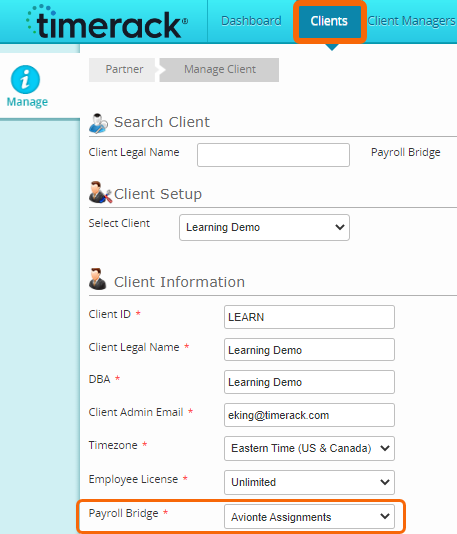
Payroll Bridge
Avionte Assignments
Organization Structure Levels
Levels one, two, and three are integrated.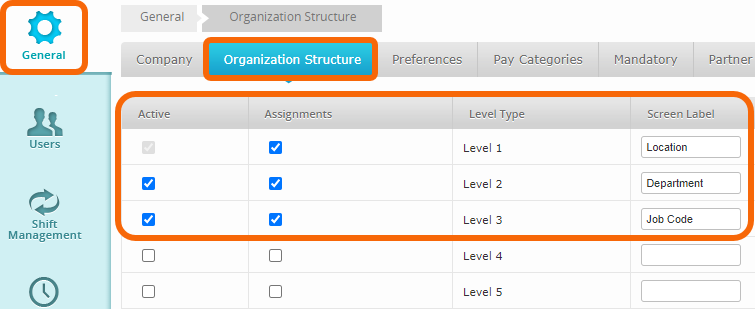
Default Pay Categories and Pay Codes
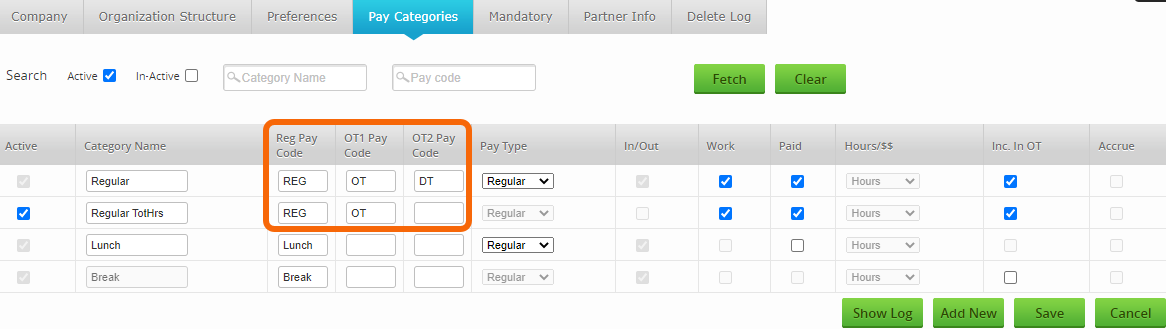
Additional Pay Codes can be mapped--see Avionté Payroll File Custom Mapping.
Field Mapping
The table below contains the default Assignment Export Field Mapping. Custom mappings can be created in the Timerack Admin portal under Billing>Map Assignments.
There are three TimeRackExtra fields (shown below) that by default are not mapped. Clients can configure "Order Extras" in Avionté to map to these fields in the file that is sent to Timerack and then we can custom map them. The Avionté help article referenced earlier contains info on how clients can set up the "Order Extras."
Data | Avionté Field | Notes |
ClientName | Parent Customer Name | Name of the parent customer that the assignment is under |
ClientID | Parent Customer ID | ID of the parent customer that the assignment is under |
EmployeeFirstName | Employee > First Name |
|
EmployeeLastName | Employee > Last Name |
|
EmployeeEmailAddress | Employee > Contact Method > Email | Contact method type where ConfigChoiceProperty “IsDefaultEmail” = True |
EmployeeID | Employee > EmployeeID |
|
EmployeeCellPhone | Employee > Contact Method > Cell | Contact method type where ConfigChoiceProperty “SystemName” = Cell |
EmployeePin | Employee > Last 4 SSN |
|
| EmployeePin_5 | Employee > Last 5 SSN | New field |
| EmployeePin_6 | Employee > Last 6 SSN | New field |
HireDate | Assignment > Start Date |
|
PayrollStartDate | Assignment > Start Date |
|
AssignmentNumber | Assignment > AssignmentID |
|
JobDescription | Assignment > Job Title |
|
AssignmentStartDate | Assignment > Start Date |
|
AssignmentEndDate | Assignment > End Date | |
DepartmentID | Assignment > Customer > CustomerID | ID of the customer the assignment is under |
DepartmentName | Assignment > Customer > CustomerName | Name of the customer the assignment is under |
BillRate | Assignment > Reg Bill Rate |
|
PayRate | Assignment > Reg Pay Rate |
|
TimeRackClientKey | Customer > Extra | Label = Time Rack Client Key |
TimeRackExtra1 | Order > Extra | SystemName = TimerackExtra1 |
TimeRackExtra2 | Order > Extra | SystemName = TimerackExtra2 |
TimeRackExtra3 | Order > Extra | SystemName = TimerackExtra3 |
| TimerackClockType | Customer > Extra | Label = Timerack Clock Type |
| BranchName | Assignment > Branch Name | |
| BranchId | Assignment > Branch ID | |
| TimerackEmployeeBadge | Employee > Extra | Label = Timerack Employee Badge |
| AssignmentShift | Assignment > Shift Name | |
| OTFactor | Customer > Order Options > Markup | Value is pulled from the Order Options screen if the job has a markup, or else we pass 1.5 |
| DTFactor | Customer > Order Options > Markup | Value is pulled from the Order Options screen if the job has a markup, or else we pass 2 |
| WorkSiteId | Order > Address ID | Value is the unique ID associated with the address record |
| WorkSiteName | Order > Address Short Name | |
| WorkSiteState | Order > Address State | |
| Approver1FirstName | Order > Contact Roles | SystemName = TimeApprover |
| Approver1LastName | Order > Contact Roles | SystemName = TimeApprover |
| Approver1Email | Order > Contact Roles | SystemName = TimeApprover |
| Approver2FirstName | Order > Contact Roles | SystemName = TimeApprover2 |
| Approver2LastName | Order > Contact Roles | SystemName = TimeApprover2 |
| Approver2Email | Order > Contact Roles | SystemName = TimeApprover2 |
| AgencyCode | Agency > Reference ID | Reference ID of the Agency if the assignment is associated with an Agency under the Assignment > Detail > More Info screen |
| AgencyName | Agency > Full Name | Reference ID of the Agency if the assignment is associated with an Agency under the Assignment > Detail > More Info screen |
| OrderID | Order > OrderID | |
| PayPeriod | Order > Detail > Pay Period | |
| SkillCodeID | Order > Job Title | Value is the unique ID associated with the job title |
| OvertimeBillRate | Assignment > OT Bill Rate | |
| DoubleTimeBillRate | Assignment > DT Bill Rate |