
Additional Troubleshooting
Arrows back and forth on Clock near or on the ‘World’ icon
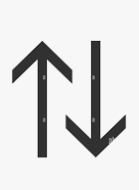
There are 2 paths for clock data---the Punch Path and the Config Path.
- If the clock is not heartbeating and there are no up/down arrows on the clock, updates will not flow down to the clock. You will see punches still coming up to TR, however.
- Most likely cause: Corrupt Table.
- Resolution: Update firmware to the latest .17.
- To test: Have client go into the menu, and you will then see an operations command post in Elastic. This tells you the clock is communicating but not syncing down to the clock.
- If the up/down arrows are stuck, you will still see commands other than heartbeat in Elastic .
- Most likely cause: The up/down arrows usually relate to unknown punches or Bad Punch Code that the clock server does not know how to process.
- Resolution: Remove the unknown by deleting all data
Step 1: Confirm clock connected to WiFi or Ethernet, either is fine. Just needs to be connected.
Step 2: Download punches from clock to a USB
Step 3: Delete all Data
Step 4: Reboot Clock (can simply power down or Query 834)
Step 5: Sync data to clock
**Verify newest Firmware is updated as well.