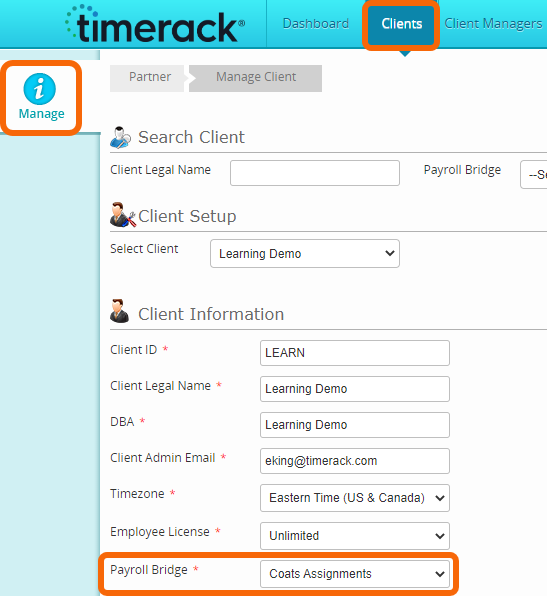
This article explains how to configure a portal integrated with COATS software.
About the integration
The integration must be turned on at the partner level in COATS by the COATS team. Once the integration is active in COATS at the partner level, clients can then turn it on at their Client level to activate their capability to push assignments data to Timerack. The video linked below is from COATS and the video link can be shared with clients.
To transmit data to Timerack, clients trigger a file send in COATS via SFTP. Interval can be set by the client but must be a minimum of 5 minutes. COATS team must give clients access to the .exe file to push Assignments to Timerack. The file will include the End Date of an Assignment within 14 days from date of file. If End Date is outside of this range (retroactively entering an End Date older than 14 days), the user will need to manually enter the Assignment End Date in Timerack, as it will not be included in the file. |  |
The payroll import file is a .csv file the user will download from Timerack and then import into COATS.
The PDF created by the COATS team attached at the bottom of this article contains detailed instructions on configuring the Timerack integration in COATS, authorizing users to enter the Client Key in COATS, pushing Assignments data to Timerack, and importing the payroll file into COATS.
Portal Configuration
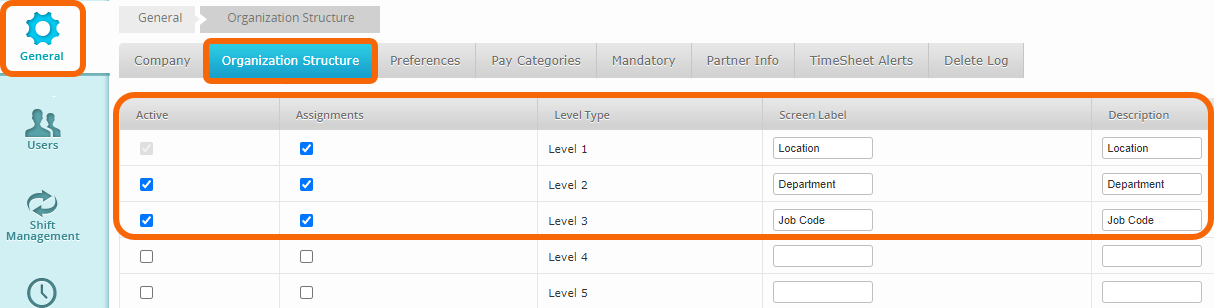
Levels one, two, and three are integrated.
| Timerack Level | COATS field |
| Level 1 | client_name |
| Level 2 | skill_text |
| Level 3 | ponumber or jobname |
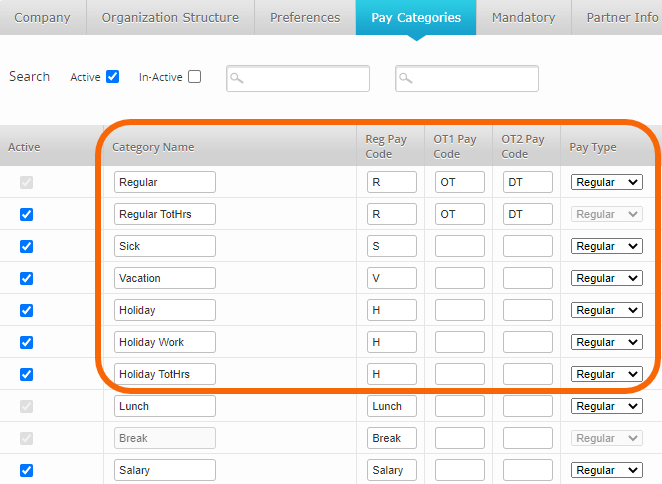
Bonus – OPY, Bonus Pay
NTS – NonTaxable reimbursement
NTX – requires transcode, pay rate bill rate
OPY – requires transcode, pay rate bill rate