
This article explains how to configure a portal integrated with Carvin software (Staffing Complete).
About the integration
Timerack Onboarding team make up the Client Key and provide it to Partner admin to enter it in the TimeRack ID field on their Customer in Staffing Complete. Once the integration is activated at the Customer level to send Timerack a file, it needs to be activated for individual personnel to include employee records in that file. This article on Carvin's help site explains how Carvin users turn on the integration to send Customer and Personnel data to Timerack.
The end of the article mentioned above also explains how clients manage the placements (“assignments”) in Staffing Complete for the information to transmit correctly to Timerack. An Employee does not need an Assignment End Date for the client to mark them as Inactive in Timerack. If the placement has ended in Staffing Complete, the employee will never be included in the integration file to change status back to Active.
Carvin does not require that personnel be on an Order, however it does require that the employee be on a Placement with both the "Active" and "Timeclock" checkboxes marked. It is best to avoid using the phrase, "on an active assignment," as clients may confuse that with either being on an Order or being on a Placement. The Placement is the trigger for the employee record to be included in the file sent to Timerack.
Adam--VP
Patrick and Greg
Portal Configuration
Levels one, two, and three are integrated.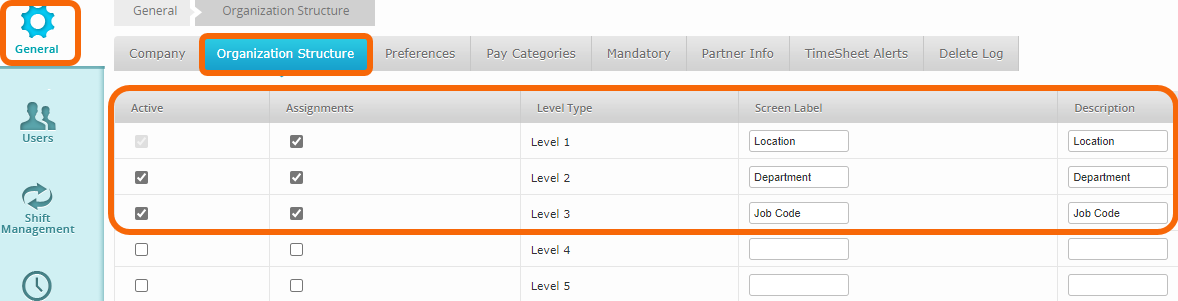
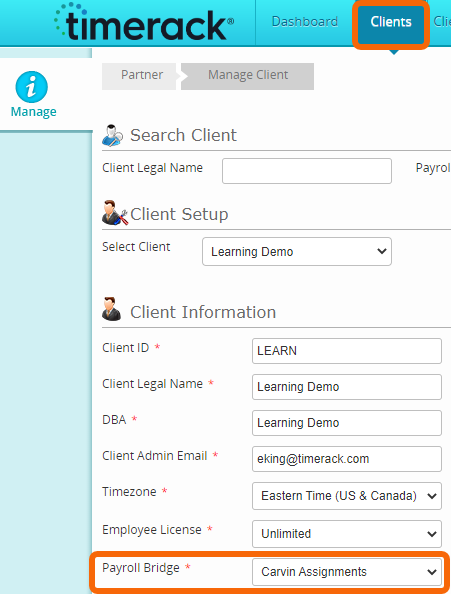
Carvin Assignments
ADV BONUS COMMISSION DT FRINGE HOLIDAY LUNCH OT OTHER PTO REG REIMBURSEMENT SICK TRANS UNITS VACATION | 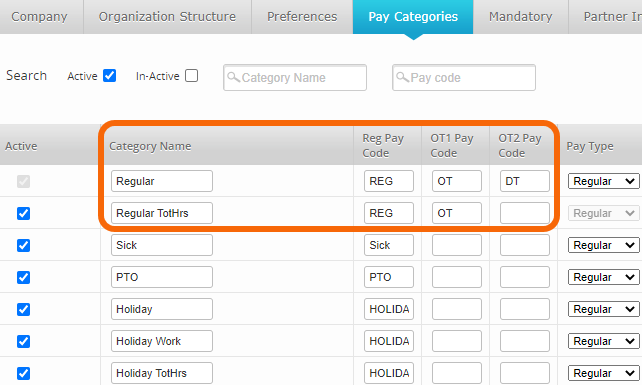 |